Translate Us iPhone Guides
How to translate a receipt on iPhone
Short answer: Translate one receipt item with its headings, then compare the quantity, unit price and line amount against the original. If a shortened name remains unclear, point to that exact line and ask the merchant to explain it.
Read unfamiliar receipt words, compare the original quantities and prices, and prepare one clear question about a line you do not understand.

Published by Clara Publisher
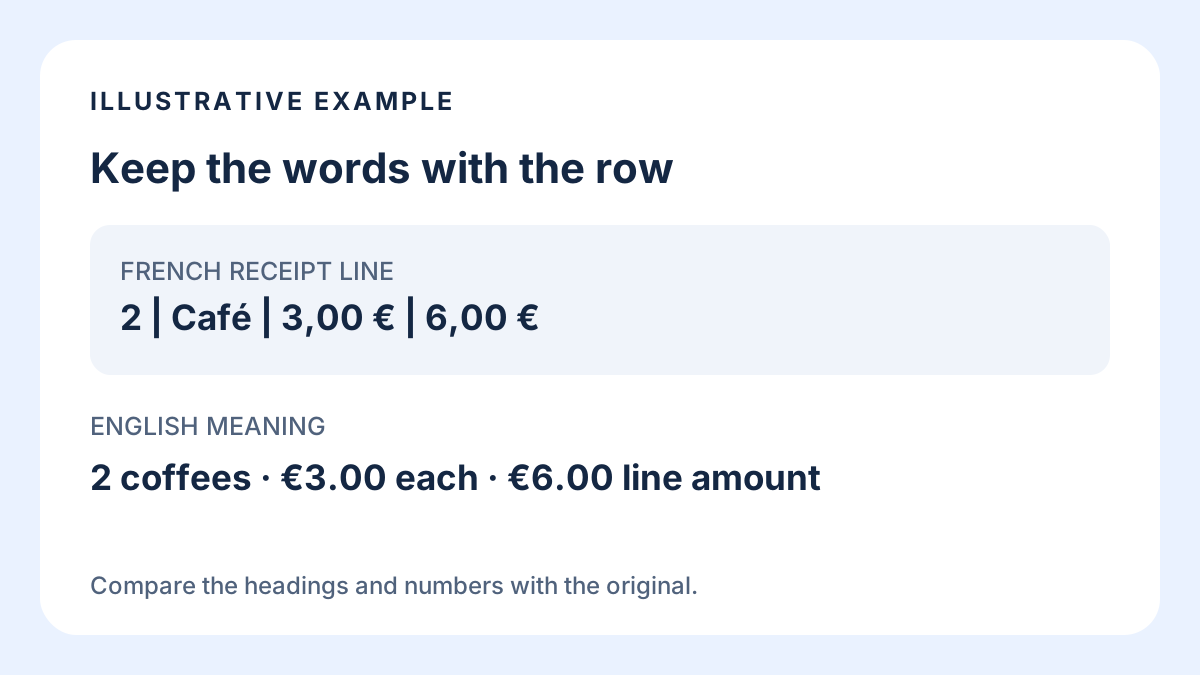
To translate a receipt on iPhone, start with one item and the headings above it. Read the translated words, then match each original number to its column. Keep the receipt visible while you check the quantity, unit price and line amount. A translated item name alone does not tell you which price belongs to it.
Translate Us lists photo and text translation on its App Store page, checked on 15 October 2026. You can try a readable receipt line or type its wording into text translation. The example below is constructed editorial material, not a captured app result or a test of receipt recognition.
French → English · Illustrative workflow
Read the receipt line, then ask about its quantity
Constructed editorial example. Keep the original row visible; this is not captured app output or a claim of table extraction.
-
Keep the headings with the item
French input
Qté | Désignation | P.U. | Montant 2 | Café | 3,00 € | 6,00 €
-
Read the English meanings
English translation
Quantity | Item name | Unit price | Line amount 2 | Coffee | 3,00 € | 6,00 €
-
Point to the original line
We ordered one coffee. Could you check the quantity on this line?
Read the headings before the item name
Find the heading attached to each number before translating the item description. A quantity, a price for one item and an amount for the line answer different questions. A cropped item name without its headings can leave you with readable words and an unclear purchase.
Start with the line you need to understand. Include its headings when available, and keep the receipt for reference. A long receipt does not need to become one translation task. For photo framing and image quality, use the image-translation guide linked below.
A French receipt row, with the numbers kept in place
In this constructed example, Qté stands for quantité, P.U. for prix unitaire, and désignation identifies the item. Montant is the amount. Café means coffee here. These expansions belong to this example; an unfamiliar abbreviation on your own receipt still needs confirmation.
The row says two coffees, each priced at 3,00 €, with 6,00 € on that line. The arithmetic is 2 × 3,00 = 6,00. This illustrates the column relationship. It does not establish what was ordered or verify a real merchant's calculation.
Example
- Original headings
- Qté | Désignation | P.U. | Montant
- Original row
- 2 | Café | 3,00 € | 6,00 €
- English headings
- Quantity | Item name | Unit price | Line amount
- English reading
- 2 | Coffee | 3,00 € | 6,00 €
- Useful question
- We ordered one coffee. Could you check the quantity on this line?
- Basis
- Constructed editorial example, not a merchant receipt or captured Translate Us output.
French original
| Qté | Désignation | P.U. | Montant |
|---|---|---|---|
| 2 | Café | 3,00 € | 6,00 € |
English meanings
| Quantity | Item name | Unit price | Line amount |
|---|---|---|---|
| 2 | Coffee | 3,00 € | 6,00 € |
Choose a photo or a short copied line
For paper, Translate Us's listed photo translation provides an image input option. Keep the original receipt beside the result. This guide has not tested whether the app recognizes a particular receipt, preserves columns or extracts a table.
If words are selectable in a digital receipt, copy the item and relevant headings into text translation. Apple also documents copying and translating photo text with Live Text on supported iPhones and languages. Its guide specifies iPhone XS, XR or later with iOS 15 or later. If selection is unavailable, type the exact wording instead.
Compare each number with its original column
Return to the original after reading the translation. In the example, 2 belongs to quantity, 3,00 € belongs to unit price, and 6,00 € belongs to line amount. Keep those strings unchanged while reading the English meanings. The decimal comma and currency symbol remain part of the source.
If several lines have similar names, use their position and original wording to identify the one you mean. Do not attach a nearby amount to an item because the translated layout looks convincing. When the relationship is unclear, ask the merchant to point to the item and its amount.
Ask about an abbreviation without guessing
A shortened product name may remain unclear when every character has been read correctly. Copy it exactly, including digits or punctuation, and keep the full line available. An expanded word is still a guess until its meaning fits the item.
Translate one question that identifies the problem. Ask what the abbreviation means, whether the number is a quantity, or which item the line describes. Point to the source while showing the question. If the reply introduces another unfamiliar term, ask for its full written name.
Try one line before translating the whole receipt
For a first task in Translate Us on iPhone, copy or type one short item name and its headings into the listed text-translation feature. Compare the wording with the original, then prepare one question if needed. Keep the original receipt until the item and its numbers are clear.
The useful result is a receipt line you can explain and refer to. This workflow does not promise automatic table extraction, currency conversion or a corrected total. If the source is unreadable or the label still makes no sense, ask the merchant for clarification.
Questions to translate
Four questions about the original receipt
These complete English source sentences are ready to translate separately. Point to the original line while showing the question.
Could you explain the item name on this line?What does this abbreviation mean in full?Is this number the quantity or the price for one item?We ordered one coffee. Could you check the quantity on this line?
Quick check
Before you translate
- Read the item with its headings.
- Keep the original quantity, currency and amounts unchanged.
- Match each number to its original column.
- Ask for the full wording of an unclear abbreviation.
- Keep the receipt available for the reply.
FAQ
Frequently asked questions
Can I translate a paper receipt on iPhone?
You can try a photo-translation feature or use supported iPhone text recognition to select the words. If recognition misses them, type a short line exactly. Compare the result with the original receipt.
Can Translate Us translate receipt photos?
Translate Us lists photo translation. Receipt-specific recognition and column preservation have not been tested for this guide, so keep the source visible and use typed text when the image result is unclear.
What do Qté and P.U. mean on the example receipt?
Here, Qté means quantité, or quantity, and P.U. means prix unitaire, or unit price. Abbreviations vary; ask the merchant when the same letters are unclear on a different receipt.
Why does a translated item not match the amount I expected?
First check the original quantity, unit-price and line-amount columns. A number may belong to another line, or an abbreviation may still be unclear. Point to that exact source line and ask the merchant to explain it.
Sources
Useful links
Take it with you
Read one receipt line on iPhone
Try a short item name and its headings in Translate Us text translation. Compare the result with your original receipt before asking a follow-up question.
Explore Translate Us