Translate Us Photo Translation on iPhone
Translate Arabic Text From a Photo on iPhone: Check Words and Numbers
Short answer: Keep the photo as the reference, preserve each line and its number, and check Arabic word order without reversing character strings or digit sequences.
A printed Arabic sign, complete English rendering and practical checks for reading direction, numbers and photo legibility.

Published by Clara Publisher
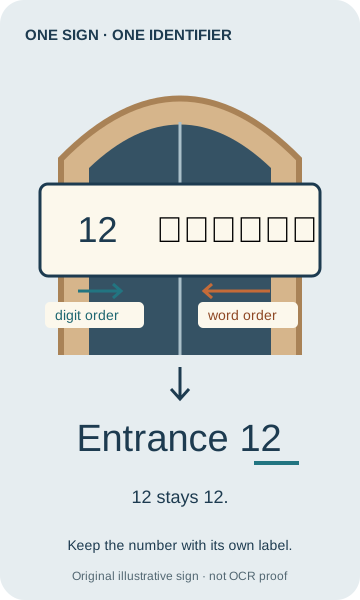
When translating printed Arabic text from a photo on your iPhone, keep the original image and check each line separately. Arabic writing runs right to left, but a number such as 12 keeps its digit order. Do not reverse the letters or turn 12 into 21 to make the line look right.
Separate two questions: what characters are on the sign, and what those words mean. If the photo does not establish a letter or number, a smooth English translation is not enough to settle it.
Arabic → English · Illustrative workflow
Keep the entrance number attached to its label
Original illustrated sign and editorial translation, not captured app output or Arabic OCR proof.
-
Original illustrated sign
Arabic input
المدخل 12
-
Finished illustrative English reading
English translation
Entrance 12
-
Compare the identifier
12 stays 12. The sign gives no opening hours or walking directions.
An entrance sign for a US traveler
Imagine an English-speaking traveler from the United States looking at a printed entrance sign abroad. Our original illustration contains one Arabic word and one numeric identifier: المدخل 12. Its complete English rendering is Entrance 12. The number identifies the entrance; it is not a quantity, price or date.
This is a constructed sign and an editorial translation, not a photographed location or an app result. The example is deliberately short so you can compare the full source with the full finished reading.
Example
- Exact printed input
- المدخل 12
- Arabic word
- المدخل
- Complete English rendering
- Entrance 12
- Number check
- 12 remains 12, not 21.
- Finished reading
- The sign labels entrance number 12. It does not state an opening time or tell you whether the entrance is open.
Keep word direction and number direction separate
Arabic letters are read in a right-to-left sequence. Within a multi-digit number, the digits keep their normal left-to-right order. A line can therefore contain different directional runs. Copy the complete line without manually reversing either the letters or the number.
Arabic letters can join and change their visible form according to position. Detached-looking letters in copied text, or an apparent change of direction near punctuation, are reasons to compare with the original image. They are not instructions to rearrange characters until the result looks familiar.
For this sign, compare the word as a whole with المدخل and check the numeric identifier separately against 12. The English reading is Entrance 12. Keep the number associated with its own line instead of moving it to a neighboring label.
Example
- Word check
- المدخل → Entrance
- Numeric identifier
- 12 → 12
- Wrong numeric reversal
- 21 is a different entrance number.
- Wrong conclusion
- The source does not say “12 entrances.”
Start with a clear image and preserve the layout
Keep an uncropped reference showing the whole sign, plus a close view of the line you need. Face the sign squarely, reduce glare and make sure small dots and punctuation are visible. Avoid letting the edge of a crop cut through a word or hide the number beside it.
If several lines label different doors, rooms or objects, keep a separate record for each line. Preserve top-to-bottom sequence and visible groupings. Do not merge a number from one line with a word from another merely because the translated output places them next to each other.
- Keep the whole sign as your reference image. Identify the exact line or label you need.
- Make a close view that preserves the entire line, including numbers, punctuation and small marks.
- Get a reading of that line and compare its source text with the photo before interpreting the translation.
- Keep the exact source line, translated wording and any numeric identifier together in a note.
- Compare the finished reading with the whole sign. Confirm which physical entrance or object the label belongs to.
Check a photo translation against the printed source
A photo-translation result is a proposed reading, not a substitute for the image. Compare the extracted source characters with the original first, then compare the meaning. If you cannot read Arabic, concentrate on preserving the complete line and matching numbers, and ask an Arabic reader to confirm unclear letters before relying on the wording.
For the example, the complete record is Source: المدخل 12; English: Entrance 12; Identifier: 12. That is enough to retain the label and number. It does not justify adding directions such as turn left, which are absent from the source.
If you already have a trustworthy transcript, use that complete line for text translation. Do not retype Arabic by guessing the shapes of letters. Preserve the original transcription and compare the translated number with the source.
Example
- Complete reference record
- Source: المدخل 12 English: Entrance 12 Identifier: 12
- What can be used
- The label and its numeric entrance identifier.
- What remains outside the source
- Opening hours, access permission and walking directions.
When a letter, digit or line is uncertain
A blurred dot or missing part of a letter can change the reading. Retake the image or obtain a clearer copy before accepting a guessed word. If the sign is still unclear, show the complete reference to a reader of Arabic and identify the exact line you need checked.
If the number could be 12 or 17, retain that uncertainty explicitly. Do not choose the one that makes the English result seem more plausible. The useful next action is to verify the printed digit, not to translate the same uncertain transcript again.
Arabic script is also used by languages other than Arabic. Establish the language from the source or a knowledgeable reader instead of assuming that every Arabic-script sign is Arabic. This guide does not establish dialect recognition or app language coverage.
Keep a checked source alongside your next translation
Translate Us offers photo and text translation for iPhone. Keep the sign and its line-by-line record available when you work on another translation. If you have a checked source transcript, it also gives you text to compare with the result.
The listing does not establish that every language is supported in every mode, or that a particular Arabic sign will be recognized correctly. Confirm the language and mode you need before relying on a photo result. The source and number checks above remain useful with any translation you obtain.
Reading record
Keep the source and finished reading together
An illustrative reading record, not an app command.
Source: المدخل 12
English: Entrance 12
Check: 12 stays 12. The sign gives no opening hours or walking directions.
Quick check
Before you translate
- Keep the complete original image.
- Preserve words, punctuation and numbers.
- Retain order and context.
- Resolve unclear source text before relying on the result.
FAQ
Frequently asked questions
Should I reverse Arabic text before translating it?
No. Preserve the original character sequence. Arabic text is displayed right to left, while numbers can contain left-to-right digit sequences. Manually reversing letters or digits changes the source.
Why does 12 not become 21?
The digits within this number retain their order. The sign’s identifier is 12. Reversing it would point to a different identifier, not translate the original.
What if the translation combines two lines?
Return to the original image and make a separate record for each printed line. Keep its word and number together, then check the translated lines in the original layout.
Can I rely on a result if I cannot read Arabic?
You can preserve the full source, compare numeric identifiers and avoid adding unsupported details. Ask a reader of Arabic to check uncertain letters or consequential wording; fluent English alone does not prove correct recognition.
Was the illustrated sign tested in Translate Us?
No. It is an original illustration and editorial translation. The product listing supports photo and text translation generally, not a verified Arabic OCR result for this sign.
Sources
Useful links
Take it with you
Keep the source visible while you translate
Translate Us offers photo and text translation for iPhone. Bring your next clear source image or checked text, confirm support for the language and mode you need, and compare the result with the original. View Translate Us on the App Store.
Explore Translate Us