Find Now · Device-finding guide
Find Multiple Lost Bluetooth Devices Without Mixing Their Clues
Give each missing item its own record before searching. Keep its physical description, last confirmed use, current observations and next action together. Update only the item an observation actually identifies. Close a record when that physical item is accounted for; finding one device or seeing a strong unfamiliar signal does not resolve the other.

Published by Clara · Publisher
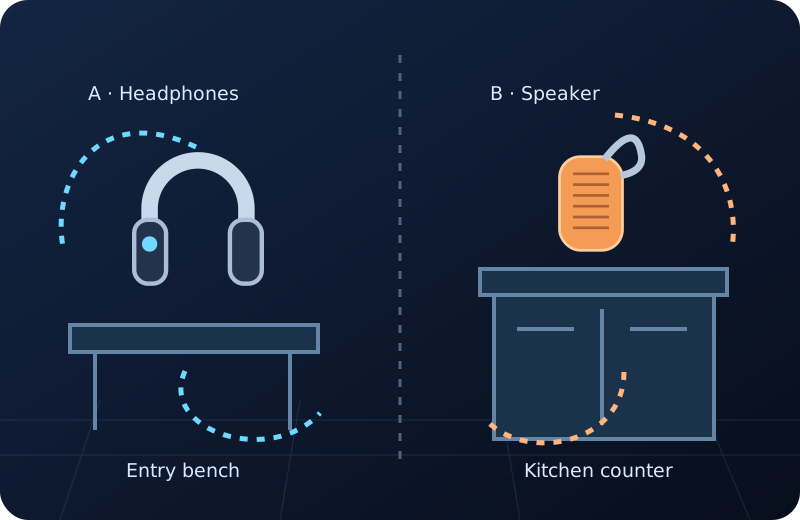
Two searches become unreliable when “the signal,” “the bag” and “found it” lose their subjects. The fix is a record for each physical target, with an explicit unresolved state when a clue does not identify either one. A paper note works.
This guide handles the bookkeeping between two searches. It does not promise simultaneous tracking, a batch mode or a particular app screen. Use the separate identification and search guides below when one target needs a deeper check.
Completed example
Worked example: headphones found, speaker still missing in Raleigh
Starting information
At home in Raleigh you are missing two items: A is your black over-ear headphones with a blue sticker; B is your orange portable speaker with a gray carrying loop. You last put A in your zippered gym tote on the entry bench. You last used B on the kitchen counter; afterward you moved a grocery bag from that counter to the pantry floor, but you do not know whether B moved. The tote, bench, counter, grocery bag and pantry floor are accessible in your home. During the search you physically find the blue-sticker headphones inside the tote. You also note a strong nearby Bluetooth entry with no established link to either item. You have not checked the counter or pantry yet.
Useful outcome
A: identity is the blue-sticker headphones; physically found in the gym tote; status accounted for; no further search action. B: identity is the orange speaker with gray loop; last confirmed on the kitchen counter; counter, grocery bag and accessible pantry floor remain unchecked; status still missing; next action is inspect those supplied locations. Unassigned observation: strong nearby entry, identity unknown; do not attach it to B because A was found. Keep B open until the physical speaker is accounted for.
Illustrative two-record result derived from the supplied events. The physical find belongs to the example; it is not a performed recovery or measured app scan.
Make one record per physical target
Write a stable label such as A and B beside the item’s plain description. Include the missing component: a whole headset, one earbud, its case or a speaker. Do not let a scan label replace that physical description.
For each record, use the same four fields: last confirmed handling, current evidence, physical status and next action. Unknown is a usable status. It is more informative than copying the other target’s location into an empty field.
Use an update rule that cannot close the wrong search
- Create A and B from facts you already know. Record identifying marks and each last confirmed handling event. Keep a possible movement, such as the grocery bag transfer, separate from a confirmed sighting.
- Before recording an observation, name the physical target it supports. If the connection is unknown, place it in an unassigned note with its time and context. Do not distribute a strong unfamiliar reading across both records.
- When a physical item is found, compare its visible identity to its own record. In this example the blue sticker ties the tote find to A. Mark A accounted for and leave B’s evidence and status unchanged.
- For each item still missing, write one next action from that item’s supplied clues. B’s first action is inspect the kitchen counter, then the known grocery bag and accessible pantry floor. It does not inherit A’s tote search result.
- If a later clue is shown to belong to the wrong item, correct its assignment and retain the correction in the note. Reopen any conclusion that depended on it; do not preserve a false location merely because it was written first.
- End the session with an explicit count: one item accounted for, one still missing, and one unassigned observation in this example. If interrupted, those separate states tell you exactly which search to resume.
One completed search should not erase an open one
The body illustration contrasts the identified headphones put aside with a separate speaker outline that remains unresolved. It does not show the speaker’s location or an actual finder interface.
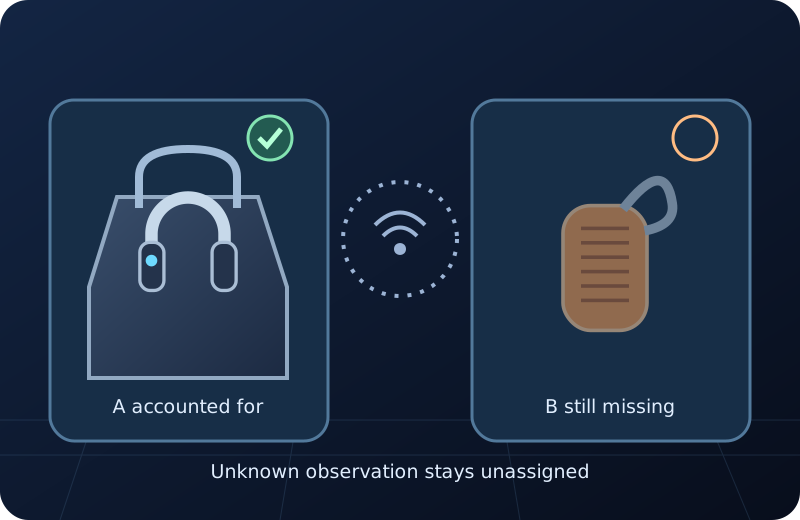
A case, earbud and headset are different completion states
If the missing list has a right earbud and its case, finding the case resolves only the case unless you physically check that the right earbud is inside. Keep each missing component named. Do not treat a known device label as proof that every piece is accounted for.
The same rule applies when another household member has a similar object. A returned black headset needs a credible link to your own description. Finding someone else’s item is useful information, but it does not close your record.
Use local feedback within one target’s search
Find Now’s published purpose includes Bluetooth finding with signal-strength feedback. If your own missing target is detectable nearby, that feedback can be an additional observation in its record. Keep the record on paper or in your own notes; no particular app note-taking feature is assumed.
You already have enough information to produce the example’s finished result without an install. A local finder is an optional next tool for the still-missing nearby target, not evidence that the second item has been found.
Questions that come up next
Can I use one note for both missing devices?
Yes, if it contains two clearly separated records and an unassigned-observation area. Give every status and next action a target label. Avoid a single found/not-found checkbox for the whole search.
Does a strong signal belong to whichever item is still missing?
No. The signal may have no established connection to either item. Keep it unassigned until there is a credible identity link; finding A does not prove the entry is B.
What if both devices show the same name?
Keep their physical descriptions and histories separate. A repeated name does not establish which physical item produced an observation. Resolve identity using the identification guide before assigning that clue.
What counts as complete when I find an earbud case?
Account for exactly what you physically identified. If an earbud is also missing, check whether it is actually in the case. A case find alone leaves that separate earbud record unresolved.
Does this require a simultaneous tracking feature?
No. The method is a paper or personal-notes workflow around separate targets. It makes no claim about Find Now batch controls, saved notes or simultaneous device tracking.
For your next nearby search
Add local feedback to the target that is still missing
After one item is accounted for, consider Find Now for your own remaining detectable nearby target. Its Bluetooth signal-strength feedback can add a clue to that item’s search; keep unknown entries separate and close the record only when the physical item is accounted for.
Explore Find Now