Find Now · Device-finding guide
Hand Off an Unfinished Lost-Device Search Without Losing Your Place
Send a handoff that names the missing item, the time you stopped, the exact areas checked and what remains unchecked. Keep uncertain signal observations separate from physical results. Give the next person one clear starting action, then ask them to confirm the remaining scope before continuing. “I checked the bag” is too broad if only its front pocket was opened.

Published by Clara · Publisher

A search can stall during the change of person, even when both people know the missing object. The first searcher remembers which pocket was opened; the second hears only that the bag was checked. The missing information is the boundary of the work already done.
This is a one-item handoff method using a message, paper note or your own notes. It assumes no Find Now sharing, saved-search or collaboration control. The complete transfer works without installing anything.
Completed example
Worked example: Maya stops, Jordan resumes in a Raleigh home
Starting information
Maya and Jordan share a Raleigh home. Their missing item is an orange portable speaker with a gray carrying loop, last physically seen on the living-room bookshelf at 5:30 p.m. At 6:10 Maya must leave. She checked the shelf’s front edge but not behind its books, and the front pocket of their shared backpack but not its main compartment. Those two unfinished areas are accessible. At 6:05 she noted a strong nearby Bluetooth entry near the entry bench but could not link it to their speaker. Jordan will resume at 6:30. At 6:40, after the handoff, Jordan physically finds the orange speaker with the gray loop in the backpack’s main compartment.
Useful outcome
Handoff at 6:10: Orange speaker with gray loop, still missing. Last physically seen on living-room bookshelf at 5:30. Checked only shelf front edge and backpack front pocket. Not checked: backpack main compartment and behind the shelf’s books. Unassigned observation: strong entry near entry bench at 6:05; not identified as this speaker. Next action: inspect backpack main compartment, then the accessible space behind the books if still missing. Jordan’s 6:30 readback: Main compartment and behind books remain open; old entry is not a confirmed speaker clue. Jordan’s 6:40 reply: Orange speaker with gray loop physically found in main compartment; item accounted for, stop this search. Behind-books check is no longer needed for this missing speaker.
Illustrative completed handoff and reply from supplied events. No real household search, message exchange or measured Bluetooth session was performed.
Describe completed scope instead of declaring an area clear
“Backpack front pocket checked; main compartment unopened” transfers more information than “bag checked.” The same distinction applies to a shelf’s visible edge versus the accessible space behind its books. The first statement preserves an unfinished task; the second can erase it.
Write what was actually examined, not what the area’s name could include. Do not treat a brief look as a complete inspection of all compartments or hidden surfaces.
Write the handoff before you leave
- Name the physical target and one recognizable detail. For this example use orange speaker with gray loop, not an unfamiliar device entry or a bare item label that could fit another speaker.
- Record the time you stopped and the last confirmed physical sighting separately. The handoff time does not make the older bookshelf sighting current.
- List the exact checked scope. Then list the unfinished scope in its own sentence. If you only opened the front pocket, do not mark the entire backpack checked.
- Put uncertain observations in a separate line with time, place and identity limit. In the example, the 6:05 entry remains unassigned. It does not become a current speaker location when Jordan arrives.
- Choose a starting action from the unfinished list. State the second action conditionally: check behind the books only if the speaker remains missing after the main compartment.
- Ask the recipient to repeat the unresolved scope in their own words. Correct any mismatch before they proceed. In a delayed handoff, leave those same specifics in writing so the next person can begin without guessing.
Make the boundary visible
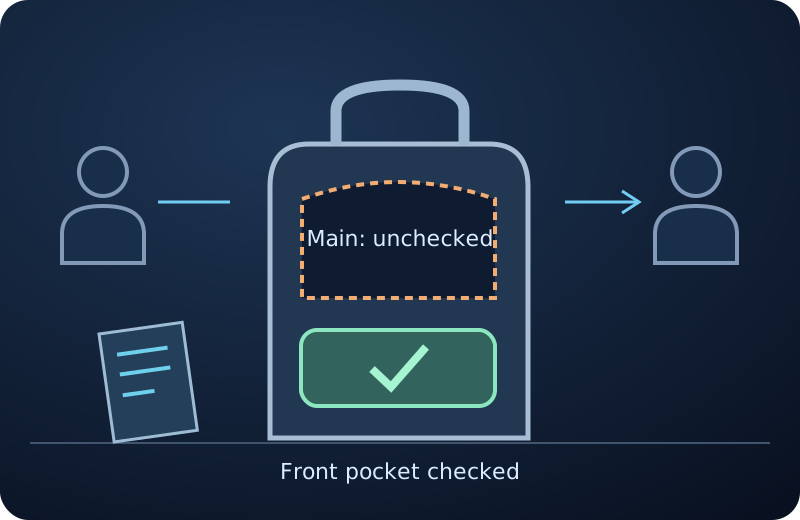
The illustration keeps the checked front pocket separate from the unopened main compartment and passes a note between two empty work positions. It depicts the scope transfer, not a real conversation or app screen.
Use the readback to catch the likely mistake
Jordan’s readback names both open areas. That would reveal the mistake if Jordan instead said “the backpack is done, so I will only check the shelf.” Correct that statement to “front pocket done; main compartment still open” before more searching.
The readback is an original coordination technique, not a claim that an app validates search coverage. If the other person is unavailable, write the same explicit boundary in the handoff note; do not claim they acknowledged it.
Do not transfer an old signal as a fresh location
Bluetooth behavior depends on the equipment and environment. Preserve the time and identity limit of an observation rather than writing “speaker at bench” when the only evidence was an unidentified entry.
If the next searcher later obtains a credible observation linked to the actual speaker, add that new event with its own time. Keep Maya’s earlier note intact as history. This method does not establish that an old reading can be replayed or shared through Find Now.
Close the handoff with a physical result or an open next step
Jordan’s final reply identifies the actual orange speaker and gray loop in the main compartment. That supplied physical find closes the missing-item task, so the second area need not be checked for this item. The reply does not claim that the shelf was searched.
If the speaker were still missing, the reply should name what Jordan checked and which action remains. Keep the distinction between item accounted for, area inspected and observation unassigned. Each answers a different question.
Where a local finder fits during the resumed search
Find Now’s listing describes Bluetooth signal-strength feedback for device finding. For a credible detectable nearby target, a new local observation can help prioritize the next accessible check. It does not certify which compartments another person inspected.
Keep the handoff in your own message or note. No shared account, remote view, location-sharing feature or app control is established by this guide.
Questions that come up next
What should I send if I only have time for one message?
Include item identity, stop time, exactly checked scope, unfinished scope, uncertain observations and the next action. The worked handoff gives a complete message. Remove background before removing the distinction between front pocket checked and main compartment unopened.
Can the next person rely on my strongest Bluetooth reading?
Preserve its time, place and identity limit. An unidentified entry from an earlier session is not a current location for the missing item. The next person needs their own credible evidence before treating it as a target clue.
What if I cannot get a readback before leaving?
Leave the explicit written handoff with a starting action and unfinished list. Mark acknowledgment as not received rather than inventing agreement. The recipient can use those details when they resume.
Must every remaining area be checked after the item is found?
Not for that missing-item task once the correct physical object is accounted for. Record where it was found, stop the search and keep earlier unchecked areas labeled unchecked. Do not rewrite them as searched.
Does Find Now automatically share this handoff?
No such capability is verified here. This is a personal-note or message workflow. Find Now’s supported relevance is local Bluetooth signal-strength feedback for a detectable nearby target, not certified shared search history.
For your next nearby search
Add a new local clue when the next person resumes
If the unfinished search concerns your own detectable nearby device, consider Find Now’s Bluetooth signal-strength feedback for the next accessible check. Keep the handoff in your own notes and distinguish a fresh target observation from an old unidentified entry.
Explore Find Now