Find Now · Device-finding guide
Apple Find My vs. a Bluetooth Finder: Choose the Clue You Need
Use Apple Find My information for an item already covered by that service, keeping its location and timestamp together. A Bluetooth finder serves a different stage: following an identified target that is detectable nearby. If you have neither a usable item record nor a credible local target, retrace where you handled the item. Installing a local finder does not turn an old map observation into a current nearby signal.

Published by Clara · Publisher
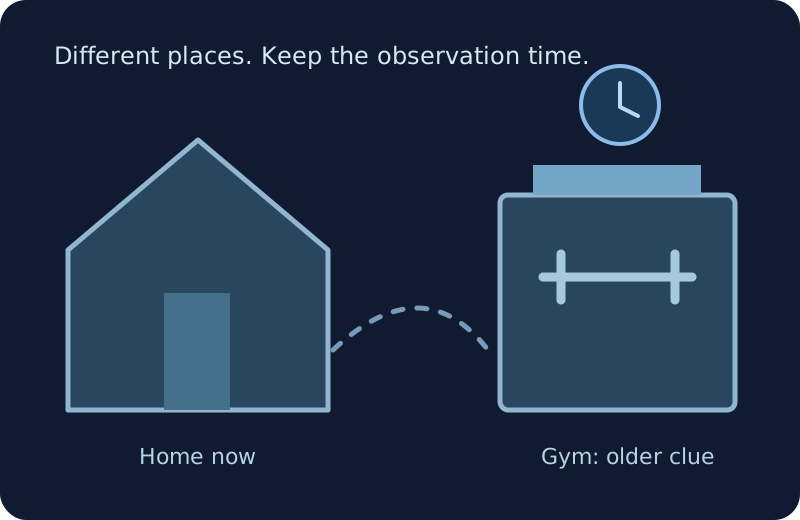
The useful choice is about the clue you need next. A record associated with your own item, a local radio observation and your last-use memory each answer a different question. None should silently replace the others.
Apple Find My and Find Now are separate products. This guide compares their documented purposes within a search decision, not speed, accuracy or a hands-on recovery result. It gives no native app tap sequence.
Completed example
Worked example: AirPods last observed at a Denver gym
Starting information
Your AirPods already have a record in Apple Find My. The information you have says the Denver gym at 10:15 a.m. You last remember handling them on that gym’s locker-room bench. The gym’s front desk handles lost-property questions. It is now 11:00 a.m. and you are home. You have no identified local observation that links a nearby signal to those AirPods.
Useful outcome
Use the existing item record and last-use bench as the next leads: preserve gym, 10:15 a.m., and contact the gym’s front desk about that bench. Do not treat a local scan at home as a search across town. If a later credible clue places your own detectable target nearby, local signal feedback becomes a different next stage. The old gym observation alone does not prove the AirPods are still on the bench.
Illustrative decision from supplied clues, not a live Apple record, measured Bluetooth scan or recovered-device test.
Choose between three questions, not two brand names
“Where was my item reported?” calls for the item record and its timestamp. “Can I follow my own target in this area?” calls for a credible nearby observation. “Where did I last put it down?” calls for a physical timeline.
The example belongs to the first and third questions. There is an existing record and a remembered bench, while no local target is established at home. That is enough to choose the next lead without downloading anything.
Make the choice from the information you already have
- Write the missing item and component first: complete headphones, one earbud, case or speaker. List the evidence you actually possess rather than choosing a tool from its name.
- If you already have an Apple Find My record for that item, copy its place and observation time into your note. Separate an old observation from a current update. Use the recorded place as a lead, not proof of the present room or shelf.
- Ask whether your own target has a credible link to a current local observation. If yes, a local Bluetooth finder can be relevant to the nearby stage. If several unfamiliar entries are all you have, resolve identity before following their strength.
- If there is no usable record or credible local target, write the last place you physically handled the item and the next place you walked. Check the accessible containers and surfaces from that timeline or contact the relevant venue.
- Reassess when new evidence arrives. A venue finding your item, a newer item-record observation or an identified nearby target can change the next action. Keep earlier notes dated instead of merging them into one supposedly live location.
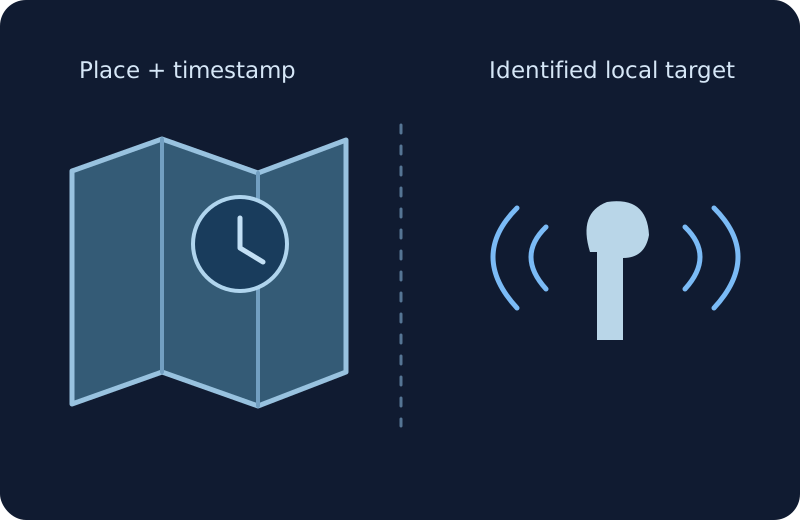
A recorded place and a local signal are different evidence
The illustration keeps a time-marked place separate from a nearby radio clue. It does not connect the two as though a local finder could reach the building named in an old record.
Bluetooth visibility does not establish Find My compatibility
Apple describes supported Apple devices and other products designed to work with Find My. A generic Bluetooth label is not a compatibility certificate or an account-linked item record.
Check the exact product’s supported recovery options before assuming it can be added to a service. An item being absent from your current record does not by itself prove that no setup is possible; it only means that record is not a clue you currently have.
Near and away require different next actions
A known missing speaker that is detectable beside your apartment’s desk presents a local search question. An old AirPods observation at a gym across town presents a place-and-time lead. Those situations do not support the same promise from a Bluetooth finder.
Bluetooth SIG describes range as dependent on the equipment and environment. Do not convert the word Bluetooth into a citywide recovery claim, or use one universal range number to decide where an item must be.
Where Find Now fits after this decision
Find Now’s listing describes Bluetooth finding with signal-strength feedback. Consider it when the decision leads to your own detectable nearby target, rather than expecting it to replace an account-linked record or a last-use timeline.
A signal can help choose a reachable area to check. The guide does not establish access to Apple’s Find My network, guarantee detection of a particular item or promise that a strength change identifies the owner.
Questions that come up next
Is Find Now the same app as Apple Find My?
No. Treat the names as separate products. Apple documents its recovery service for supported items; Find Now’s listing describes local Bluetooth device finding. This guide does not establish shared accounts, network access or native integration.
Which should I choose if an item is at another location?
Use a credible item record or last-use lead for that location, preserving its time. A local Bluetooth search from your current room does not establish a signal at a building across town.
What if I have a nearby signal but no item identity?
Keep it unresolved and use the identification guide first. Strength or a familiar name alone does not establish that the target is your missing equipment.
Can I finish the decision without installing a finder?
Yes. Record whether an item record exists, whether an identified local target exists and where you last handled the item. The steps then select the next lead or physical check without an installation.
Does an old location prove the item is still there?
No. Keep the displayed timestamp with the place and look for newer evidence. The worked example uses the old gym observation to choose a lead, not to claim the AirPods are still on the bench.
For your next nearby search
Choose local feedback for the nearby stage
If your next step is a search for your own detectable nearby target, consider Find Now’s Bluetooth signal-strength feedback. Keep older item-record locations and timestamps separate; a download does not turn those records into live local evidence.
Explore Find Now