Find Now · Device-finding guide
Find Lost AirPods in Your House: Find My Clues and a Room Search
Use the location and time already available in Apple Find My as clues, then search the last-use room in zones: clothing and bags, seating, nearby surfaces, and floor edges. A home map pin does not tell you which couch cushion holds an earbud. If the location is old or unavailable, retrace your movements instead of assuming the AirPods are still there.

Published by Clara · Publisher
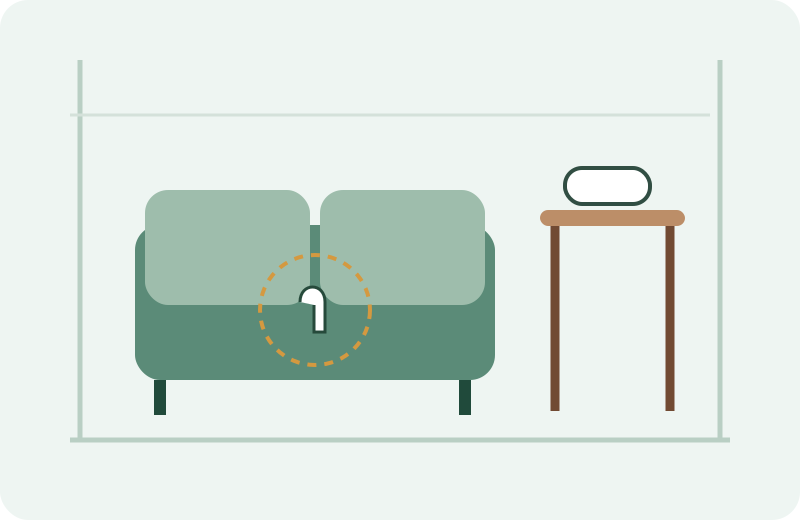
For a lost pair in a US apartment, the useful question is often smaller than “Where are my AirPods?” It is “Which places have I already ruled out?” Keep the charging case, left earbud and right earbud separate in your notes; finding one does not finish the search for all three.
This guide works from clues you already have. It explains how to organize a physical search, not a tap-by-tap Find My tutorial. Apple Find My and Find Now are separate apps.
Completed example
Worked example: a missing earbud after an apartment study session
Starting information
Last used both earbuds on the living-room couch at 8:10 p.m. Wore a hoodie there, then walked to the kitchen. The case is on the desk. An existing Find My reading says home at 8:12 p.m.; it is now 8:40 p.m.
Useful outcome
Search the couch and the hoodie worn there first, then the couch-to-kitchen path. Record the desk as case found, earbuds still missing. Treat 8:12 p.m. as an old observation, not proof of the current room.
Illustrative planning example, not a captured app result or a report of recovered AirPods.
What Apple Find My can tell you, and what it cannot settle
Apple documents map, sound and nearby-finding features for supported AirPods; availability depends on the model and circumstances. An offline status or last-known location calls for a different decision from a fresh nearby observation.
Write down the place, observation time and which component the information describes. “Home at 8:12 p.m.” leaves the room unresolved. An old reading also leaves open whether someone moved the earbuds afterward. This is why the worked example starts with last use, not the center of the map pin.
Search one room without checking the same place twice
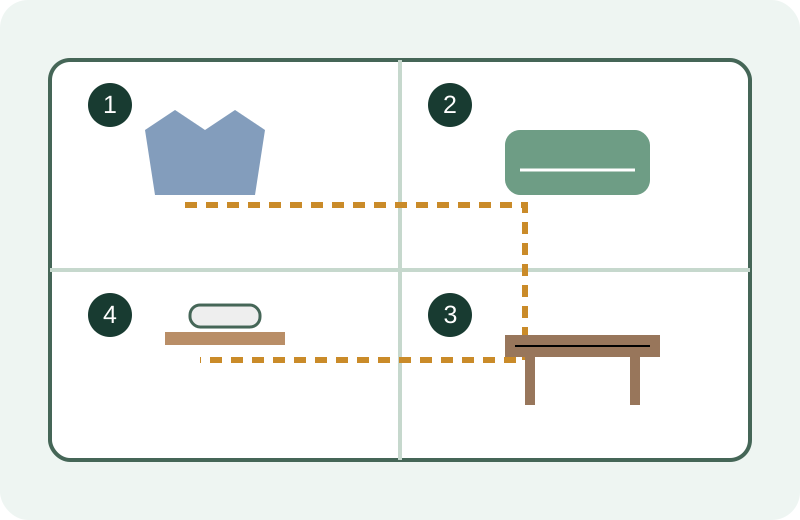
- Write one starting line: last used where, at what time, wearing which clothes, and carrying which bag. Put the case and any found earbud somewhere visible so they stay accounted for.
- Check the clothes and bag from that moment. Empty each pocket onto a clear surface, then return its contents after checking the lining and seams. Keep checked bags separate from unchecked bags.
- Inspect the seat where you last listened. Remove cushions one at a time, check seams and the gap behind the seat, then examine the floor beneath it with a light. Do not move heavy furniture alone.
- Follow the route you walked next. Check the nearest counters and shelves before widening to the next room. Mark each zone checked, found or not yet checked on a short list.
- If the room is clear, write the next unresolved place from your timeline. A newer credible location outside home changes that next place; an old home pin does not rule out your car, backpack or another room.
Keep the search visible
The diagram groups places by the order in the apartment example. It is a search plan, not a Bluetooth coverage map. The numbered route does not predict signal strength or show an app calculating a direction.
If the AirPods are offline, in a case or not detected
Do not interpret silence or an empty local scan as a cleared room. Apple documents that out-of-range or uncharged AirPods may show an old location or no location, and nearby actions may be unavailable.
A local Bluetooth finder needs a detectable nearby transmission. Whether an earbud or charging case is detectable depends on the hardware and its current state. This guide does not promise detection through a closed case or from an empty battery. Keep using the physical checklist when radio clues are unavailable.
When Find Now fits the next part of the search
Once you have a plausible room and an identifiable nearby device, signal-strength feedback can add a local search clue. Find Now’s official listing describes Bluetooth device finding and real-time signal feedback. Treat that feedback as one clue alongside the room checklist, not a measured distance or evidence of ownership.
If the likely loss was outside home, keep working from the last-use timeline and the Apple recovery information relevant to your model. Installing a nearby finder does not add a missing device to Apple Find My.
Questions that come up next
Does a Find My pin at my house tell me which room to search?
No room is established by that clue alone. Record the reading’s time and combine it with last use, clothing, bags and the path you took afterward.
Can a Bluetooth finder find AirPods with a dead battery?
Do not rely on it for that job. A local radio search requires a detectable transmission. Use last-known clues and the physical search plan when a device cannot transmit.
What if only one earbud is missing?
Account separately for the left earbud, right earbud and case. Keep found pieces in one visible place; search from the last use of the missing piece rather than the case’s location.
Do I need to download Find Now to use this checklist?
No. The room sequence and worked example are complete without an app. Find Now is an optional local Bluetooth search aid when a nearby target is detectable.
For your next nearby search
Add a Bluetooth clue to your room search
Have a likely room and a detectable nearby target? Find Now offers Bluetooth signal-strength feedback for the local part of the search. Keep your checked-zone list alongside it.
Explore Find Now