Translate Us iPhone Guides
Draw kanji to translate it on iPhone
Short answer: Use a documented handwriting input or touch kanji lookup, verify the candidate shape, then recover and interpret the complete word. Translate Us is an optional later text-translation step.
Identify an unknown kanji by drawing, compare the candidate and recover the whole word before looking up its meaning on iPhone.

Published by Clara Publisher
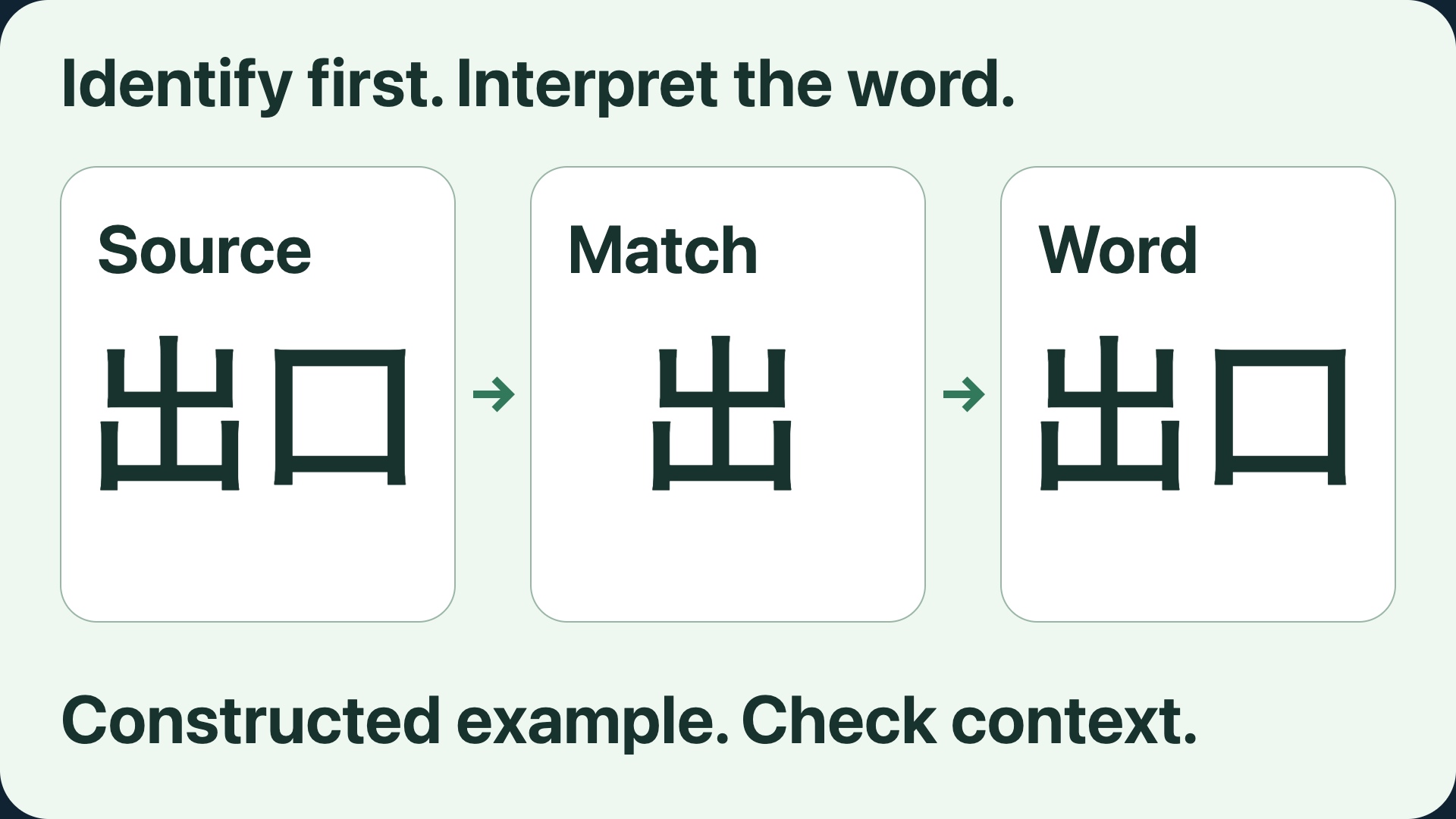
To draw a kanji and translate it on iPhone, use a handwriting input tool to identify the character, compare its shape with the original, then look up the complete word. Google documents handwriting in its iPhone Translate app for supported languages. JapanDict offers a touch drawing canvas and radical search in a browser. Translate Us can be a later text-translation step after you recover the source text.
This guide reviews official instructions and dictionary entries. It does not report a hands-on recognition test or measured app results. AIPoweredApps makes Translate Us; Clara is the publisher, not a claimed Japanese-language reviewer.
Japanese → English · Illustrative workflow
Identify the character, then check the full word
Constructed editorial example with dictionary-backed reading and meaning. No drawing recognizer result, screenshot or captured Translate Us output is presented.
-
Retain the original word
Japanese input
出口
-
Restore the word and look it up
English translation
出口 → でぐち (deguchi) Exit; way out
-
Check the surrounding context
Compare the recovered word with the original and confirm which dictionary sense fits.
Choose the input method that matches what you have
If you can select the Japanese text, copy the full word. If you have a readable photograph, start with the iPhone camera kanji guide. Drawing becomes useful when the shape is visible but you cannot copy it or type its reading.
Use a handwriting translator when you want to enter a character and inspect a translation in the same app. Use a kanji lookup when you need to compare possible characters first. Keep the original beside either result; a plausible match can still be the wrong character.
Use Google's documented iPhone handwriting input
In Google Translate, select the source and target languages, then choose Handwriting. Draw in the writing area, inspect the suggested match, and request the translation. Google's iPhone and iPad instructions say a missing Handwriting button means the selected language is unsupported. They also describe disabling Automatic insertion if you need longer to write.
Check the recognized text before accepting its English. The handwriting feature is listed in the current iOS App Store description, which warns that features vary by language. This guide has not tested a particular Japanese drawing or app version.
Compare characters in a drawing lookup
Open JapanDict's kanji drawing search on your iPhone and trace the visible character. Its help documents touch input, updated candidates after strokes, Undo and Clear controls. It recognizes kanji, rather than hiragana or katakana. Keep separate strokes separate and compare the overall shape with each candidate.
If the candidates do not match, redraw or try the site's radical search. Radicals give you another way to locate a character by its components. Leave the identification unresolved if you cannot distinguish the candidates. Fluent English cannot confirm that the Japanese input was correct.
Worked example: recover the word 出口
The example below is a constructed editorial example. It illustrates the check to make; it is not a recorded drawing result, app screenshot or recognition-success claim.
JapanDict's 出口 entry gives the reading and the exit/way-out sense, alongside an outlet/vent sense. That is why the word and its setting matter. Identifying 出 alone does not establish the reading or meaning of every word containing it.
If the source includes more wording, retain it. A direction, label or sentence may add conditions that a single dictionary entry cannot express.
Example
- Original word
- 出口
- Character candidate to compare
- 出
- Reconstructed source
- 出口
- Dictionary reading
- でぐち (deguchi)
- Relevant meaning
- Exit; way out
- Basis
- Constructed editorial record with dictionary-backed reading and meaning; no captured recognition or app output.
Move to text translation only after identifying the source
Once you have confirmed the characters, copy or type the complete word or surrounding phrase into your chosen text translator. Keep a separate record of the recovered Japanese and the proposed meaning, so you can correct the input without starting the character search again.
The Translate Us listing, checked on 20 October 2026, describes text translation and AI dictionary tools. Those may be relevant when you also want to explore a recovered word or translate a complete message. No built-in handwriting recognizer, radical search or character-specific accuracy test is verified for Translate Us here.
Questions to ask a reader
Keep the source word available
These are English source questions to translate separately, not recorded app outputs. Show the original word while asking.
Could you write the complete word for me?Which character matches the original?Could you explain this word in its sentence?
Quick check
Before you translate
- Use drawing only when copying or typing the reading is unavailable.
- Compare the candidate character with the original.
- Restore the complete word before looking up meaning.
- Keep uncertain identifications unresolved.
- Use a separate text translator only when the recovered phrase needs it.
FAQ
Frequently asked questions
Can I draw kanji directly in Translate Us?
This guide has no verified Translate Us drawing workflow. Use the documented handwriting or lookup method above for identification. Consider Translate Us's listed text tools only after you have source text to enter.
What if Google Translate has no Handwriting button?
Google says handwriting is unavailable for the selected language when that button is absent. Recheck your selection against its current instructions. A separate kanji drawing lookup is another source-entry route.
Why is the first suggested character not enough?
Candidate matching proposes an input. Compare its strokes and arrangement with the original, then restore the word around it. If two candidates remain plausible, keep the result unresolved and ask someone who can read the source.
Can JapanDict's drawing search identify hiragana or katakana?
Its drawing-search help specifies kanji only. Do not assume that an unknown symbol belongs to that set. If the script is uncertain, preserve a clear image or ask a reader to identify it first.
Do I need another app after the drawing lookup?
Not always. A dictionary entry may answer your word-level question. A text translator becomes relevant when you need the surrounding phrase or a separate message translated.
Sources
Useful links
Take it with you
Translate a recovered message on iPhone
If you also need text translation, inspect Translate Us compatibility and language options. Start with the complete source you have verified and compare the result with your original.
Explore Translate Us