Translate Us Translation on iPhone
Translator Keyboard Full Access on iPhone: What to Decide Before Enabling It
Short answer: Full Access is a separate permission for an iPhone custom keyboard. Apple documents that open access permits network operations and shared-container writes. Adding a keyboard to the switcher does not, by itself, establish that you have granted that extra access.
Understand what keyboard Full Access permits, what it cannot tell you about data use, and how to decide before enabling a translation keyboard.

Published by Clara Publisher
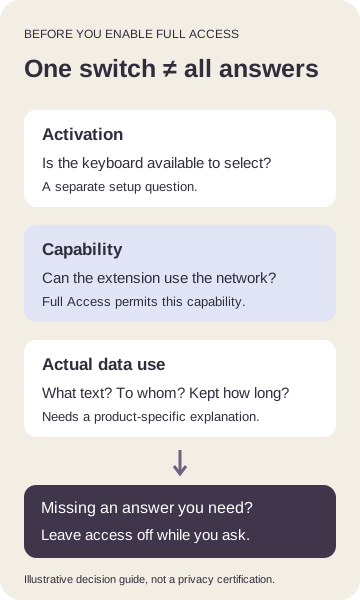
Full Access is a separate permission for an iPhone custom keyboard. Apple documents that open access permits network operations and shared-container writes. Adding a keyboard to the switcher does not, by itself, establish that you have granted that extra access.
Before enabling it, separate the capability you are allowing from the developer’s actual data practices. The permission warning does not tell you which text Translate Us sends or how long it is kept. If those unanswered questions matter to your decision, leave the permission off until you have answers.
English → Spanish · Illustrative workflow
Keep the reservation count
Editorial translation, not captured app output or a device test.
-
Original illustrative English message
English input
The reservation is for two people.
-
Finished illustrative Spanish message
Spanish translation
La reserva es para dos personas.
-
Check before relying on it
Two people stays two people; the message supplies no date or guest names.
A complete decision for a traveler’s message
Imagine a US traveler preparing a Spanish message about a restaurant reservation. The message is The reservation is for two people. A complete illustrative Spanish rendering is La reserva es para dos personas. You can use that wording here without enabling a keyboard or installing anything.
The traveler wants translation while writing in another app, but has not decided whether to allow keyboard networking. The useful outcome is an informed permission decision, not a promise that every keyboard function will work with access disabled. This example chooses to leave Full Access off while data-use questions remain unanswered.
Example
- Original English input
- The reservation is for two people.
- Complete illustrative Spanish
- La reserva es para dos personas.
- Desired task
- Prepare a bilingual reservation message while writing.
- Permission capability
- Full Access permits keyboard networking; it is not a description of actual collection.
- Unresolved information
- Whether whole-field context is transmitted, its recipient and retention period.
- Completed decision
- Leave Full Access off until the relevant data questions are answered. Use the complete wording above for this example.
- Limit
- This does not promise that the translation keyboard works without Full Access.
Separate activation, capability and actual data use
Activation answers whether iOS offers the installed keyboard in its switcher. Full Access concerns additional capabilities available to the extension. The developer’s handling of information is a third question. A setting cannot serve as the answer to all three.
Apple’s open-access documentation describes what the platform permits. Permission to communicate over a network does not establish that every keystroke is transmitted, nor does it establish that nothing is transmitted. Both conclusions need product-specific evidence.
Translate Us lists a translation keyboard. That feature listing alone does not identify which of its current functions require Full Access, what context is sent or what happens to that data afterward. Do not infer those details from a generic warning or from another translation keyboard.
Make a decision before granting the permission
Write down the feature you need and the information you would type. Then compare the access being requested with the developer’s explanation for that feature. A concrete question about a draft is more useful than asking whether an app is simply safe.
If the answer is incomplete, keeping the permission off is a complete decision for now. It is not evidence that the permission is unnecessary or that the feature will continue to work unchanged.
- Identify the exact task: keyboard translation inside another app, rather than ordinary typing or translation in a separate workspace.
- Read the Full Access explanation as a capability notice. Distinguish it from merely enabling the keyboard.
- Review the developer’s current privacy information and feature explanation for the keyboard. Look for actual statements about text scope, recipients and retention.
- Ask about any missing details before granting access when they matter to you. Use the specific questions below.
- Choose whether the stated capability and data handling fit your task. If you cannot make that decision, leave the permission off and keep the unanswered questions recorded.
Ask about the text, its recipient and its lifetime
Ask: Does translation send only the selected text, the whole field or surrounding draft context? Which service receives it? Is it stored, and for how long? Are there controls to prevent retention? Does the answer apply specifically to the keyboard extension, not just to the main app?
These questions do not assert that Translate Us performs any particular collection. They identify the information you need to evaluate a network-enabled keyboard. An answer about one feature should not silently become an assurance about every mode.
Keep the date and the relevant product version with the explanation you rely on. If the explanation changes, revisit the decision for the feature you actually use. A familiar permission name does not prove that the developer’s practices have stayed the same.
Full Access is not Full Keyboard Access
iPhone accessibility also uses the name Full Keyboard Access for navigating the phone with an external keyboard. That is a different setting from a custom keyboard’s network-related Full Access. Enabling an accessibility feature does not answer this permission question.
Likewise, keyboard visibility and translation success are separate problems. If the keyboard is absent from the switcher, use the activation guide linked below. Do not grant broader access merely because you hope it will fix a missing keyboard.
Choose the translation task that fits your decision
Translate Us lists keyboard and text translation for iPhone. Review those feature descriptions and the developer’s privacy information before choosing how to prepare another bilingual message. This page does not certify privacy or establish an exact permission requirement for every released feature.
For today’s reservation example, the complete Spanish wording is already above. The permission decision remains yours; a download is not required to obtain the answer.
Reading record
Keep the complete worked record
A complete illustrative message you can use without installing an app.
The reservation is for two people.
La reserva es para dos personas.
Check: Two people stays two people; the message supplies no date or guest names.
Quick check
Before you translate
- Keep the starting information.
- Follow the matching branch.
- Compare the complete result.
- Leave unresolved details explicit.
FAQ
Frequently asked questions
Does Full Access mean every keystroke is stored?
No such conclusion follows from the permission alone. It enables capabilities; actual text collection and retention require product-specific evidence.
Can I use keyboard translation with Full Access off?
This page does not establish that for every current Translate Us keyboard function. A feature listing alone is insufficient. Check the developer’s explanation for the precise task rather than assuming it will work unchanged.
Is adding the keyboard the same as granting Full Access?
No. Activation makes a keyboard available to select; Full Access is a separate capability decision. Diagnose visibility separately.
What if the privacy information does not answer my question?
Keep the permission off if the missing answer affects your decision. Ask specifically about text scope, recipients, retention and the keyboard extension.
Is Full Keyboard Access the same setting?
No. Full Keyboard Access is an accessibility feature for using an external keyboard to control iPhone. It is distinct from a custom keyboard’s Full Access.
Sources
Useful links
Take it with you
Choose your next translation task with Translate Us
Translate Us offers keyboard and text translation for iPhone. Review its App Store feature and privacy information, then choose the workflow that fits your message and permission decision. The complete reservation example remains available above.
Explore Translate Us